
Bot Defense
Bot Defense watches new messages for bot-like behaviour and sends evidence-backed flags to a staff review queue. Moderators decide whether the account is actually suspicious; HAF does not automatically ban members.
Availability
The Honeypot Detector and review workflow are available on every plan. The Rate Detector requires Premium or Premium Plus.
Bot Defense can reply with a warning, delete the triggering message, or do both. Configure those actions separately for each detector.
It does not automatically ban, kick, time out, or change roles. Selecting Confirm Bot records the moderator's decision only. Staff apply any account-level action separately in Discord.
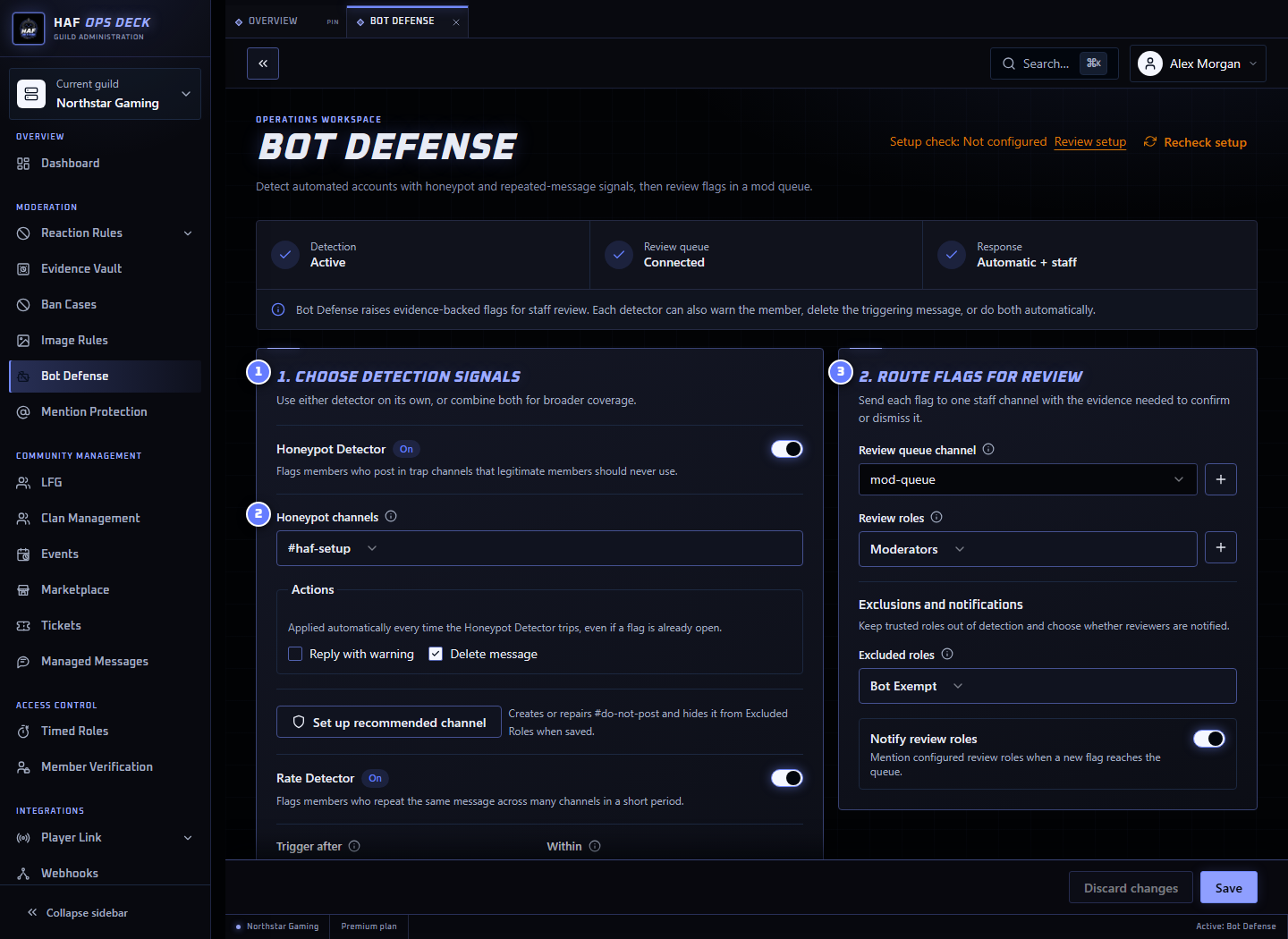
- Detection signals — Honeypot Detector, Rate Detector, or both.
- Honeypot channels — channels where ordinary members should never post.
- Review queue — private channel and roles that can resolve flags.
Quick Setup
Open Admin Dashboard → Bot Defense.
- Enable the Honeypot Detector, Rate Detector, or both.
- For Honeypot, use Set up channel or select clearly marked trap channels.
- Choose whether each detector warns, deletes, does both, or only raises a flag.
- Select a private Review Queue.
- Select the roles allowed to confirm or dismiss flags. Leave this empty for Guild admins only.
- Optionally exclude trusted roles and notify reviewers.
- Save.
Test the Honeypot with a non-admin test account. Confirm the flag appears and only the configured reviewers can resolve it.
Honeypot Detector
The Honeypot Detector flags members who post in a channel where legitimate members should never post.
The recommended Set up channel action creates or repairs #do-not-post, adds a clear warning, keeps it writable so automated accounts can trip it, and hides it from configured excluded roles.
New or untrusted members must still be able to see the channel for the detector to work.
Do not use a normal chat, rules, welcome, or Forum channel as a honeypot. Forum posts are ignored.
The configured warning and deletion actions run for every honeypot message, even while that member already has an unresolved flag.
Rate Detector
The Rate Detector flags a member who repeats the same message across too many different channels within a short period. It targets compromised accounts spreading identical phishing or crypto-scam messages.
Case, full-width Unicode, and whitespace-only differences are ignored when text messages are compared. Attachment-only messages also count when their complete image sets contain identical file bytes. Reordering the images or reuploading them with different names does not change the match. The number of attachments is not a detection rule.
HAF stores a SHA-256 fingerprint for the comparison window rather than the message text or image bytes. Image flags show the image count, matching channels, window, and latest message link; they do not copy the images into the review queue. Empty messages without supported images do not count.
Image comparison supports PNG, JPEG, GIF, and WebP attachments, up to 10 images and 5 MiB total per message. All attachments must qualify and download successfully from Discord's attachment CDN. Redirects are rejected. Downloads have a 3-second deadline per message and a limit of four active image comparisons per runtime isolate. Failed, expired, oversized, unsupported, or busy comparisons do not record a match or take Rate Detector actions.
This is an exact repetition signal, not a scam-content classifier. Cropped, recompressed, or otherwise byte-different images do not match. Messages with captions or mentions continue to use the existing text comparison; their images are not compared. A single album, repeats within one channel, and posts outside the window do not reach the cross-channel threshold. Legitimate repeated image sharing across enough channels can still raise a flag. Start with staff review, tune the threshold, and exclude suitable trusted roles.
The Rate Detector observes eligible messages across the Guild; it has no channel exclusion setting. Bot Defense's role exclusions and bot/webhook exclusions apply before image downloads. Reaction Rules and Image Rules channel settings do not scope the Rate Detector.
Configure:
- the number of different channels;
- the time window in seconds; and
- excluded roles.
A practical starting point is 5 matching messages across different channels within 60 seconds. Adjust it after reviewing real flags from your server.
Warning and deletion actions run for each message at or above the threshold.
Review Queue
Each item shows the detector, member, and available message/channel evidence.
Reviewers choose:
- Confirm Bot — the evidence supports the flag; or
- Dismiss — the flag is not useful or is a false positive.
Once resolved, the queue buttons are disabled and the decision is recorded. Confirmation does not apply a Discord punishment.
Each new queue control includes the Bot Flag's immutable createdAtMs generation inside the signed component ID. The handler only reads and resolves that exact open generation, so a control from a dismissed flag cannot act on a later re-flag for the same member. Controls issued before generation binding are rejected as obsolete and never resolve the current flag.
This uses the existing bot_flags.created_at_ms value. Re-flagging a dismissed member advances it monotonically, so no D1 migration is required.
Recommended Rollout
- Start the Rate Detector at 5 channels / 60 seconds.
- Use Set up channel for Honeypot.
- Exclude trusted staff, integrations, and long-standing member roles where appropriate.
- Watch the queue for several days before using confirmed flags in an enforcement policy.
- Raise the threshold when ordinary members are regularly flagged.
- Document what moderators should do after confirming a flag.
What Is Ignored
Bot Defense ignores:
- messages from bots;
- webhook-authored messages;
- members with an excluded role; and
- Forum posts for Honeypot detection.
Troubleshooting
- No flags: Confirm a detector is enabled and the configuration is saved.
- Flags exist but staff cannot see them: Select a Review Queue and grant HAF access.
- Staff cannot resolve flags: Add their Review Role or use a Guild administrator.
- Too many ordinary members are flagged: Raise the channel threshold, shorten the time window, or exclude a suitable trusted role.
- Reviewers are not notified: Add a Review Role and enable notifications.
Use Setup check after saving to inspect detector channels, the Review Queue, roles, and permissions. It does not send a message, trigger a detector, delete content, or create a flag.